

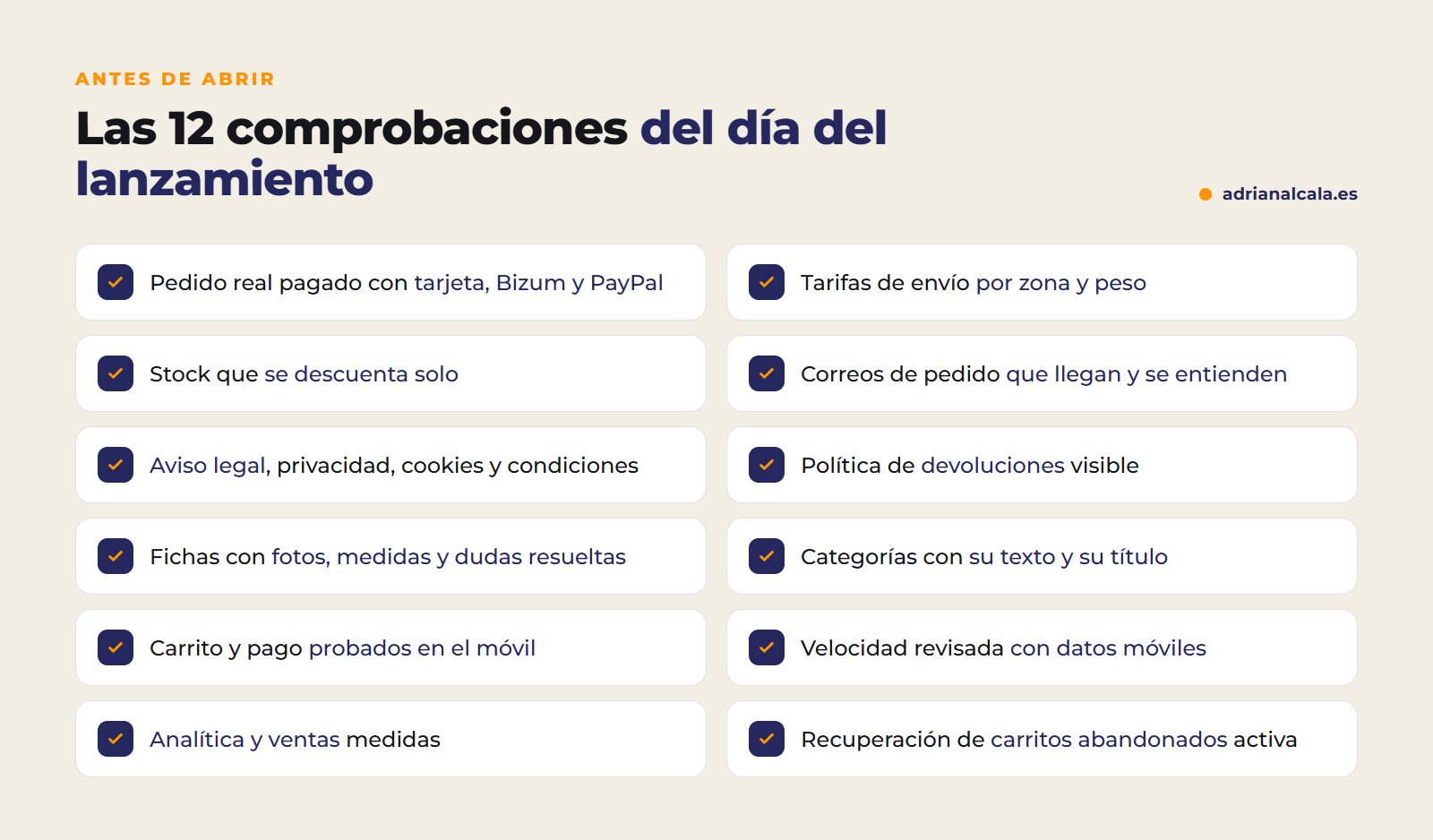
El día que abres una tienda online no se nota lo que está bien, sino lo que falta: un pago que no entra, un envío que se cobra mal o un correo de pedido que nunca llega. Esta es la lista que repaso antes de lanzar una tienda online, ordenada por bloques. Puedes ir marcando casillas a medida que compruebas cada punto: así llegas al lanzamiento sin sorpresas.
The essentials in 30 seconds
- Haz pedidos reales de prueba con cada forma de pago y cada tipo de envío antes de abrir.
- Los textos legales y la política de devoluciones no son un trámite: generan confianza y te protegen.
- The fichas de producto venden más que el diseño de la portada.
- Abre con la analítica y la recuperación de carritos ya funcionando, no «para más adelante».
In this article
- 1. Pagos: que el dinero entre
- 2. Shipping and stock: for the order to go out
- 3. Store emails: so the customer knows what's happening
- 4. Legal: trust and peace of mind
- 5. Product pages and catalog: what really sells
- 6. Mobile and speed: where most people buy
- 7. Google and measurement: know what happens from day one
- On launch day, in order
- Recurring errors in launches
- Frequently Asked Questions
- Shall we set up your store with everything tested?
1. Pagos: que el dinero entre
Es lo primero que hay que probar y lo último que debería fallar. No basta con que la pasarela esté «configurada»: hay que ver el dinero llegar.
2. Shipping and stock: for the order to go out
3. Store emails: so the customer knows what's happening
The most silent failure
WordPress emails sometimes go out without proper sending configuration and end up in spam or don't arrive. Make a purchase with a Gmail email and an Outlook email and check the inbox of both.
4. Legal: trust and peace of mind
5. Product pages and catalog: what really sells
A well-made product page sells; a pretty gallery does not. Review at least the products you most expect to sell:
If you are going to register the products yourself, you have the steps in how to add a simple product in WooCommerce.
6. Mobile and speed: where most people buy
7. Google and measurement: know what happens from day one
Regarding this last point, in cómo recuperar carritos abandonados en WooCommerce you have the complete process. And if you are also going to sell outside of Spain, in how to translate your WordPress website with AI I explain how to have the store in other languages without losing SEO.
On launch day, in order
With the revised list, on opening day it's advisable to follow an order to avoid putting out fires:
- Make a full backup of the store just before opening it.
- Remove maintenance mode and check that the store is visible without being logged in.
- Place a final real order with card and return it from the panel.
- Check that Google can enter: in Settings › Reading, the option that discourages search engines should not be checked.
- Submit the sitemap in Search Console and request indexing of the homepage and main categories.
- Notify your current customers: email, social media and, if you have a physical store, a sign with the address.
- Monitor the first orders one by one: payment, email, shipping and stock.
The first weeks are the most instructive. Write down every question customers ask you: it almost always points to something the product page or checkout doesn't explain well.
Recurring errors in launches
- Testing only with "test" orders from the panel. A real order, paid and returned, is the only thing that proves everything works.
- Opening with a half-finished catalog. It's better to launch with fewer well-presented products than with many without photos or description.
- Depending on the designer to change every price. You must be able to manage orders, prices and stock yourself.
- Leaving the store in someone else's name. Domain, hosting and store must be yours from day one.

Adrián Alcalá Online stores with WooCommerce
Before delivering a store, we test it with real orders. A store that doesn't sell is an expense, no matter how much design it has.
Frequently Asked Questions
What do I need to start an online store?
The list of products with prices and, if you have them, photos. It doesn't have to be perfect: you start with what you have and organize it along the way. What cannot be missing on opening day is what's on this list.
WooCommerce or Shopify to start?
Shopify charges a monthly fee and, depending on the gateway, a sales commission. With WooCommerce, the store is yours, without platform fees or store commissions. I explain it in more detail in the comparison between Shopify and WooCommerce.
How much does it cost to set up an online store?
It depends on the catalog size and how much you want to automate. As a reference from my service pages: a non-automated website goes from €500 to €2,000, and an automated one from €2,000 to €5,000. A store with payments, shipping, stock and cart recovery is usually in the second range.
Will I be able to manage the store myself?
You should. Orders, prices, products and stock are managed from the WooCommerce panel, and a good handover includes teaching you how to do it.
Can I open the store with few products?
Yes, and many times it's the best. Opening with a short but well-presented catalog allows you to test payments, shipping and product pages with real orders, and expand later with what you learn from your first customers.
Shall we set up your store with everything tested?
I do online store design with WooCommerce, no sales commissions: payments, shipping and stock working, real test orders before opening and everything in your name.
To go deeper
Written by Adrián Alcalá
Web designer in Dénia. If you have any questions about what you have read, write to me.